


Introduction
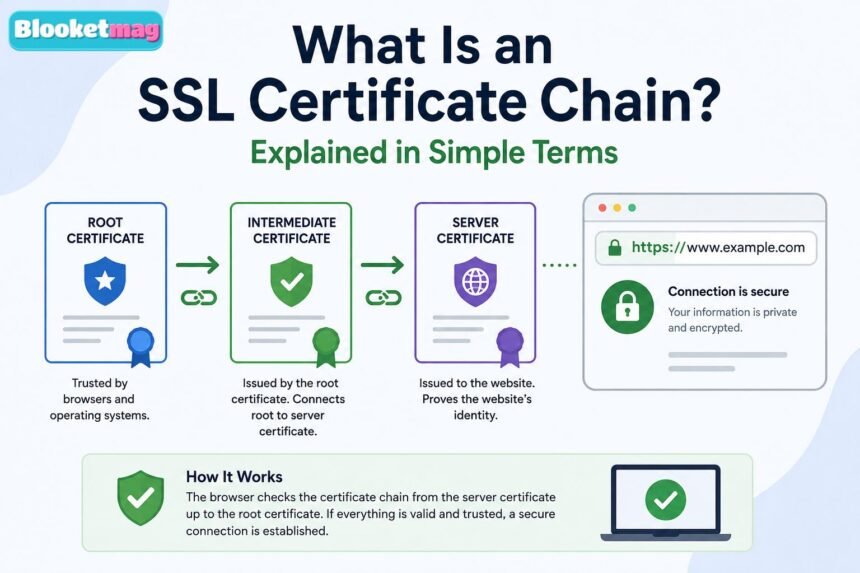
Every time you visit a website that begins with HTTPS, your browser performs several security checks before displaying the page. Although this process takes only a fraction of a second, it plays a critical role in protecting your personal information. Whether you are logging into an online account, making a payment, or simply browsing a website, your browser must first determine whether the site can be trusted.
- Introduction
- What Is an SSL Certificate Chain?
- Why SSL Certificate Chains Matter
- The Main Parts of an SSL Certificate Chain
- How an SSL Certificate Chain Works
- A Simple SSL Certificate Chain Example
- What Happens If the SSL Certificate Chain Is Broken?
- Common SSL Certificate Chain Errors
- Missing Intermediate Certificate
- Incorrect Certificate Order
- Expired Certificates
- Untrusted Root Certificate
- Certificate Mismatch
- Incomplete Certificate Chain
- How to Check an SSL Certificate Chain
- How to Fix SSL Certificate Chain Problems
- SSL Certificate Chain vs SSL Certificate
- Best Practices for Managing SSL Certificate Chains
- Frequently Asked Questions
- What is the purpose of an SSL certificate chain?
- Can a website work without an SSL certificate chain?
- How do I know if my SSL certificate chain is complete?
- What causes SSL certificate chain errors?
- Is the root certificate sent by the web server?
- Conclusion
One of the most important parts of this verification process is the SSL certificate chain. Many website owners install an SSL certificate but are surprised when visitors still receive security warnings. In many cases, the problem is not the certificate itself it is an incomplete or incorrectly configured certificate chain.
If you have ever wondered what is an SSL certificate chain, this guide explains the concept in simple terms. You’ll learn how certificate chains work, why they matter, how browsers verify websites, common errors, and best practices for maintaining a secure website.
| Label | Information |
|---|---|
| Topic | SSL Certificate Chain |
| Type | Website security component |
| Purpose | Verifies website trust |
| Used In | HTTPS connections |
| Main Components | Root, intermediate, and server certificates |
| Issued By | Trusted Certificate Authority (CA) |
| Primary Role | Builds a chain of trust |
| Security Benefit | Protects encrypted communication |
| Common Issues | Missing or expired certificates |
| Verification Method | Browser certificate validation |
| Best Practice | Install the complete certificate chain |
| Ideal For | Website owners, developers, and IT teams |
What Is an SSL Certificate Chain?
An SSL certificate chain is a sequence of digital certificates that allows a web browser to verify that a website’s SSL certificate comes from a trusted source. Instead of trusting every website individually, browsers rely on a chain of trust that starts with a trusted root certificate and ends with the website’s own certificate.
Think of it like proving someone’s identity using official documents. A driver’s license may prove a person’s identity because it was issued by a government agency. Similarly, a website’s SSL certificate is trusted because it is connected to a trusted Certificate Authority through a series of verified certificates.
Without this chain, a browser cannot confidently verify that a website is genuine. As a result, users may see warnings stating that the connection is not private or that the certificate cannot be trusted.
The SSL certificate chain is one of the foundations of secure internet communication and helps establish trust between websites and visitors.
Why SSL Certificate Chains Matter
SSL certificate chains are essential because they help browsers determine whether a website should be trusted before encrypted communication begins.
A properly configured certificate chain offers several important benefits.
- Protects sensitive information during transmission.
- Verifies website identity before encryption starts.
- Prevents man-in-the-middle attacks that attempt to intercept communications.
- Reduces browser security warnings that discourage visitors.
- Supports customer confidence, especially on websites handling payments or personal information.
For businesses, trust directly affects user experience. Visitors are much more likely to continue browsing or complete purchases when they see that a website is secure.
The Main Parts of an SSL Certificate Chain
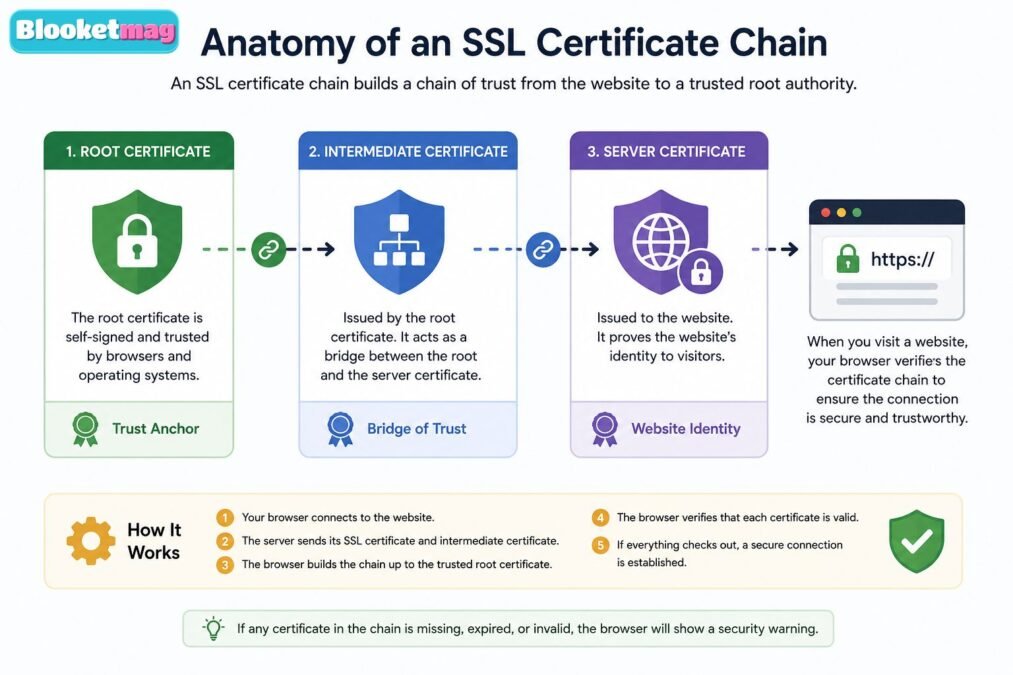
An SSL certificate chain consists of three primary components working together.
Root Certificate
The root certificate sits at the very top of the trust hierarchy. It belongs to a trusted Certificate Authority (CA) whose public key has already been stored in operating systems and web browsers.
Because browsers already trust these root certificates, they serve as the foundation for verifying every certificate below them.
Root certificates are carefully protected. Certificate Authorities rarely use them directly for issuing website certificates because compromising a root certificate would affect millions of websites.
Intermediate Certificate
The intermediate certificate connects the root certificate to the website certificate.
Instead of signing website certificates with the root certificate, Certificate Authorities create one or more intermediate certificates. These intermediates are authorized by the root certificate and then issue SSL certificates to websites.
This design improves security because if an intermediate certificate becomes compromised, it can be revoked without replacing the highly trusted root certificate.
Many certificate chains include one or even multiple intermediate certificates.
Server (Leaf) Certificate
The server certificate, often called the leaf certificate, is installed directly on the website’s web server.
This certificate includes information such as:
- Website domain name
- Organization details (depending on certificate type)
- Public encryption key
- Validity period
- Digital signature from the issuing Certificate Authority
When visitors connect to a website, this is the certificate they receive first.
How an SSL Certificate Chain Works
Although the verification process is highly technical, its basic workflow is relatively simple.
When someone visits a secure website, the following steps occur:
- The visitor enters the website address.
- The browser contacts the web server.
- The server sends its SSL certificate along with the intermediate certificates.
- The browser checks whether the certificates form a complete chain leading to a trusted root certificate already stored in its trust store.
- The browser verifies digital signatures and confirms that every certificate is valid and has not expired.
- If everything checks out, the encrypted HTTPS connection is established.
All of this happens automatically within seconds.
If any part of the chain is missing or invalid, the browser cannot verify the website’s authenticity.
A Simple SSL Certificate Chain Example
Imagine a website called examplewebsite.com.
The certificate chain may look something like this:
- Root Certificate: Trusted Global Certificate Authority
- Intermediate Certificate: Secure Web Issuing CA
- Server Certificate: examplewebsite.com
When your browser visits examplewebsite.com, it receives the server certificate and intermediate certificate.
The browser already contains the trusted root certificate.
It checks:
- Did the root certificate sign the intermediate certificate?
- Did the intermediate certificate sign the website certificate?
- Are all certificates valid?
- Have any certificates expired or been revoked?
If every answer is yes, the browser trusts the website.
This process is known as the chain of trust.
What Happens If the SSL Certificate Chain Is Broken?
A broken certificate chain prevents browsers from completing the trust verification process.
Several problems can occur.
Browser Security Warnings
Visitors may see messages like:
- Your connection is not private
- Certificate not trusted
- NET::ERR_CERT_AUTHORITY_INVALID
- SSL certificate problem
Many users leave immediately after seeing these warnings.
SSL Handshake Failure
The SSL/TLS handshake may fail before encryption is established.
This means the browser refuses to create a secure connection.
Loss of User Trust
Even if the website itself is safe, visitors often assume something is wrong when security warnings appear.
For online stores and service providers, this can significantly reduce conversions.
SEO Impact
Search engines encourage secure browsing experiences.
Although a broken certificate chain is not always a direct ranking factor, poor user experience, security warnings, and inaccessible pages can negatively affect website performance over time.
Common SSL Certificate Chain Errors
Website administrators frequently encounter a handful of common certificate chain issues.
Missing Intermediate Certificate
This is the most common configuration error.
The website sends only the server certificate without including the required intermediate certificates.
Browsers cannot complete the trust chain.
Incorrect Certificate Order
Certificates must be presented in the correct sequence.
An incorrect order may prevent browsers from validating the chain properly.
Expired Certificates
Every certificate has an expiration date.
If even one certificate within the chain expires, trust verification fails.
Untrusted Root Certificate
Older devices may lack newer trusted root certificates.
In these cases, otherwise valid websites may still trigger trust warnings.
Certificate Mismatch
The certificate must match the domain visitors are accessing.
For example:
- Certificate issued for www.serverfault.com
- Visitor accesses secure.example.com
Unless the certificate includes both domains, verification fails.
Incomplete Certificate Chain
Sometimes administrators accidentally install only part of the chain.
Even though the website certificate is valid, browsers cannot verify its origin.
How to Check an SSL Certificate Chain
Fortunately, checking a certificate chain is relatively straightforward.
Several methods are commonly used.
Browser Certificate Viewer
Modern browsers allow users to inspect certificate details directly from the padlock icon beside the website address.
You can view:
- Certificate issuer
- Validity dates
- Certification path
- Chain details
Online SSL Testing Tools
Several trusted online diagnostic services analyze SSL configurations.
These tools verify:
- Complete certificate chain
- Supported protocols
- Cipher suites
- Expiration dates
- Overall security rating
They are especially useful for website administrators.
OpenSSL
Many system administrators use the OpenSSL command-line utility.
It can retrieve certificates directly from a server and display the complete certificate chain for troubleshooting.
Hosting Control Panels
Many hosting providers include SSL diagnostic tools within their dashboards.
These utilities often identify missing intermediate certificates and installation problems automatically.
How to Fix SSL Certificate Chain Problems
Resolving certificate chain issues usually involves careful server configuration rather than purchasing a new certificate.
Common solutions include:
- Install all required intermediate certificates.
- Verify the certificate order recommended by the Certificate Authority.
- Renew expired certificates before expiration.
- Replace invalid or corrupted certificates.
- Restart web services after installation if required.
- Test the configuration after every update.
Website owners should always follow the installation instructions provided by their Certificate Authority because different web servers may require slightly different configurations.
SSL Certificate Chain vs SSL Certificate
Although these terms are often used interchangeably, they are not the same.
| SSL Certificate | SSL Certificate Chain |
|---|---|
| Identifies a website | Verifies trust between certificates |
| Installed on the web server | Includes multiple linked certificates |
| Contains the website’s identity | Creates a chain leading to a trusted root |
| Used during HTTPS connections | Used to verify certificate authenticity |
| Single certificate | Collection of related certificates |
In simple terms, the SSL certificate identifies the website, while the certificate chain proves that the certificate can be trusted.
Best Practices for Managing SSL Certificate Chains
Proper certificate management helps maintain a secure and reliable website.
Some recommended practices include:
- Always install the complete certificate chain.
- Use certificates issued by reputable Certificate Authorities.
- Monitor expiration dates regularly.
- Renew certificates before they expire.
- Test SSL configurations after every server update.
- Keep server software and operating systems updated.
- Use automated certificate monitoring where possible.
- Review browser compatibility after certificate renewals.
Routine maintenance greatly reduces the risk of unexpected certificate errors.
Frequently Asked Questions
What is the purpose of an SSL certificate chain?
Its purpose is to help browsers verify that a website’s SSL certificate originates from a trusted Certificate Authority, allowing secure encrypted communication.
Can a website work without an SSL certificate chain?
A website may still load, but browsers are likely to display security warnings because they cannot establish trust in the certificate.
How do I know if my SSL certificate chain is complete?
You can inspect the certificate path using your browser or use trusted SSL testing tools to verify that all required certificates are correctly installed.
What causes SSL certificate chain errors?
Common causes include missing intermediate certificates, expired certificates, incorrect installation order, certificate mismatches, and incomplete server configurations.
Is the root certificate sent by the web server?
In most cases, no. Browsers already store trusted root certificates locally. The web server typically sends only the server certificate and the necessary intermediate certificates.
Conclusion
Understanding what is an SSL certificate chain is essential for anyone who manages a website or wants to learn how secure browsing works. While visitors often notice only the padlock icon in their browser, that symbol represents a sophisticated trust system built on multiple certificates working together.
The SSL certificate chain ensures that a website’s certificate can be traced back to a trusted root Certificate Authority. This chain enables browsers to verify authenticity, establish encrypted connections, and protect users from impersonation and other security threats. When the chain is complete and correctly configured, visitors enjoy a seamless and secure browsing experience. When it is broken, browsers display warnings that can damage user confidence and disrupt access to the site.
For website owners, maintaining a healthy certificate chain is just as important as installing the SSL certificate itself. Regularly checking certificate validity, installing all required intermediate certificates, monitoring expiration dates, and testing configurations after updates can prevent many common issues. By following these best practices, you help ensure that your website remains trusted, secure, and accessible to visitors across modern browsers and devices.